Why a Private Group Chat Matters More Than Ever in 2026
A family group chat can hold years of photos, private updates, and personal conversations. A work group may contain client details, project discussions, and sensitive documents. A close group of friends may share information that was never meant to leave the conversation.
Yet many people treat group chats as casual spaces.
They add people quickly. They share images without checking what data is attached. They leave old chats on devices for years. They assume a lock icon or an encryption claim means every part of the conversation is protected.
But group privacy is more than message encryption.
A private group chat app should help protect the conversation itself, the people inside it, the photos and files they share, and the information left behind after a discussion ends.
This does not mean people need to become cybersecurity experts. It means they need a communication space that respects normal expectations of privacy.
Group chats contain more personal information than you think
A one-to-one chat is private between two people. A group chat can involve family, friends, colleagues, customers, classmates, or community members.
The more people involved, the more information can be exposed.
Consider what may be shared in an ordinary group conversation:
- Home addresses and delivery instructions.
- Children’s photographs and school information.
- Travel plans and live locations.
- Work schedules and meeting details.
- Client updates and project files.
- Health information or family emergencies.
- Financial discussions.
- Private opinions and personal support.
None of this information is unusual. However, it can become sensitive when shared with the wrong person, copied outside the group, stored indefinitely, or exposed through a lost device.
A private messaging app should make it easier to keep everyday conversations where they belong: with the people you intended to include.
Why encryption alone is not the full answer
End-to-end encryption is essential because it protects message content between the sender and the recipient. However, group privacy requires more than encrypted text.
A group chat can still create risks through:
- Unnecessary contact access.
- Phone-number exposure.
- Media metadata.
- Screenshots and forwarded content.
- Unprotected device notifications.
- Chat history stored on multiple devices.
- Old messages remaining available for too long.
- Members joining or leaving without clear access controls.
This is why people should look beyond a single security claim when choosing a private texting app.
Private communication should include the ability to control what you share, who can reach you, how long content stays available, and what information is attached to shared media.
6 signs your group chat may not be private enough
1. Your contact list is required
Many messaging services ask for access to your device contacts. This may make it easier to find people, but it also means the app can access information about people who did not choose to join the platform.
xPal states that it does not access your contacts or other data on your device. Its private messaging operates between xIDs, giving users greater control over who can reach them.
2. Everyone sees more information than necessary
A private group does not always need everyone’s phone number, email address, or personal details. The less personal data linked to a group chat, the lower the risk of unwanted exposure.
3. Shared photographs include hidden information
Images and videos may include metadata such as the time, location, device, or software used to create the file.
xPal’s Photo & Video Sanitizer is designed to automatically strip metadata from shared media before it is encrypted and sent.
4. Messages stay available forever
Some conversations should remain available. Others only need to exist for a few minutes, hours, or days. Keeping every private message forever increases the impact of a lost device or unwanted access.
xPal’s Flicker Mode can be enabled on a per-chat basis and automatically deletes messages from both sender and receiver devices after they are seen. Users can choose a message lifetime from 30 seconds to one day.
5. You cannot manage sensitive chat history
Deleting a chat from your own screen does not always remove it from other connected devices.
xPal’s Terminate Mode is designed to erase an entire chat history from the user’s device and, once the command is received and processed, from the recipient’s supported and connected xPal client.
6. Your files are stored without extra protection
Shared files can include private documents, personal images, business records, and other sensitive material. If those files remain accessible on an unlocked device, they can create privacy risks long after the conversation ends.
xPal’s XAVE Encrypted File Vault is described as a device-level encrypted vault for storing private files locally on a device.
What makes a private group chat safer?
The best group chat experience should not make people choose between privacy and ease of use. It should give them simple controls that work in the background.
A private group chat app should provide:
- End-to-end encryption for group messages.
- Clear control over invitations and membership.
- Private identifiers instead of unnecessary personal exposure.
- Protection for text, media, and calls.
- Metadata removal for shared photos and videos.
- Disappearing-message options for temporary information.
- Tools for managing chat history.
- Strong device-level access controls.
- Privacy practices that limit unnecessary data collection.
- Evidence of external security assessment.
xPal describes its group messaging as private group communication protected with end-to-end encryption and privacy controls for members.
Private chat is not only for business or security professionals
Some people think privacy tools are only for businesses, journalists, or people with sensitive jobs.
That is not true.
A private chat app can be useful for:
- Parents organising school activities.
- Families sharing private news.
- Couples discussing personal matters.
- Friends planning a surprise.
- Freelancers communicating with clients.
- Small teams sharing work updates.
- Community organisers coordinating events.
- People managing personal documents and photographs.
Privacy is not about having something suspicious to hide. It is about controlling who can access your normal life.
Just as you close the curtains at home or lock your phone, using private communication tools is a practical way to set reasonable boundaries.
The hidden risk in shared photos and videos
A picture can reveal much more than what appears on the screen.
For example, a photo taken outside a home may show a visible house number. It may also carry hidden metadata that can reveal when and where it was taken. A video from a workplace may expose names, faces, internal documents, or private conversations in the background.
Before sharing personal media in a group, ask:
- Does this image reveal a location?
- Can someone identify a child, home, workplace, or car?
- Does the image include hidden location or device metadata?
- Will the media still be appropriate if it remains visible later?
- Does every group member need to receive it?
xPal’s Photo & Video Sanitizer automatically removes metadata before the media is encrypted and sent. This does not remove visual details already visible in an image, but it can help reduce hidden data exposure.
Why temporary messages can be useful
Disappearing messages are often misunderstood. They are not only for secretive conversations.
They are useful for routine messages that do not need to remain on a device permanently, such as:
- A gate code for a visitor.
- A delivery instruction.
- A temporary location.
- A meeting reminder.
- A short-lived password or access detail.
- An image that does not need long-term storage.
- A quick work update.
Using temporary messages can reduce the amount of sensitive information stored across multiple devices.
xPal’s Flicker Mode lets a user choose how long messages remain available after they are seen, from 30 seconds to one day.
However, it is important to be realistic. No messaging app can stop a recipient from taking a screenshot, copying a message, or using another device to record the screen. Temporary messages reduce storage exposure. They do not create absolute control over what another person does with information they receive.
Extra controls for lost or shared devices
Many privacy problems do not begin with a hacker. They begin with a misplaced phone, an unlocked tablet, or a device handed to someone else.
A private texting app is more effective when it includes practical controls for these everyday risks.
xPal lists several additional privacy and security features:
- Decoy PIN, which can hide real data until the regular PIN is used.
- Offline-Lock, intended to prevent chats from being accessed offline.
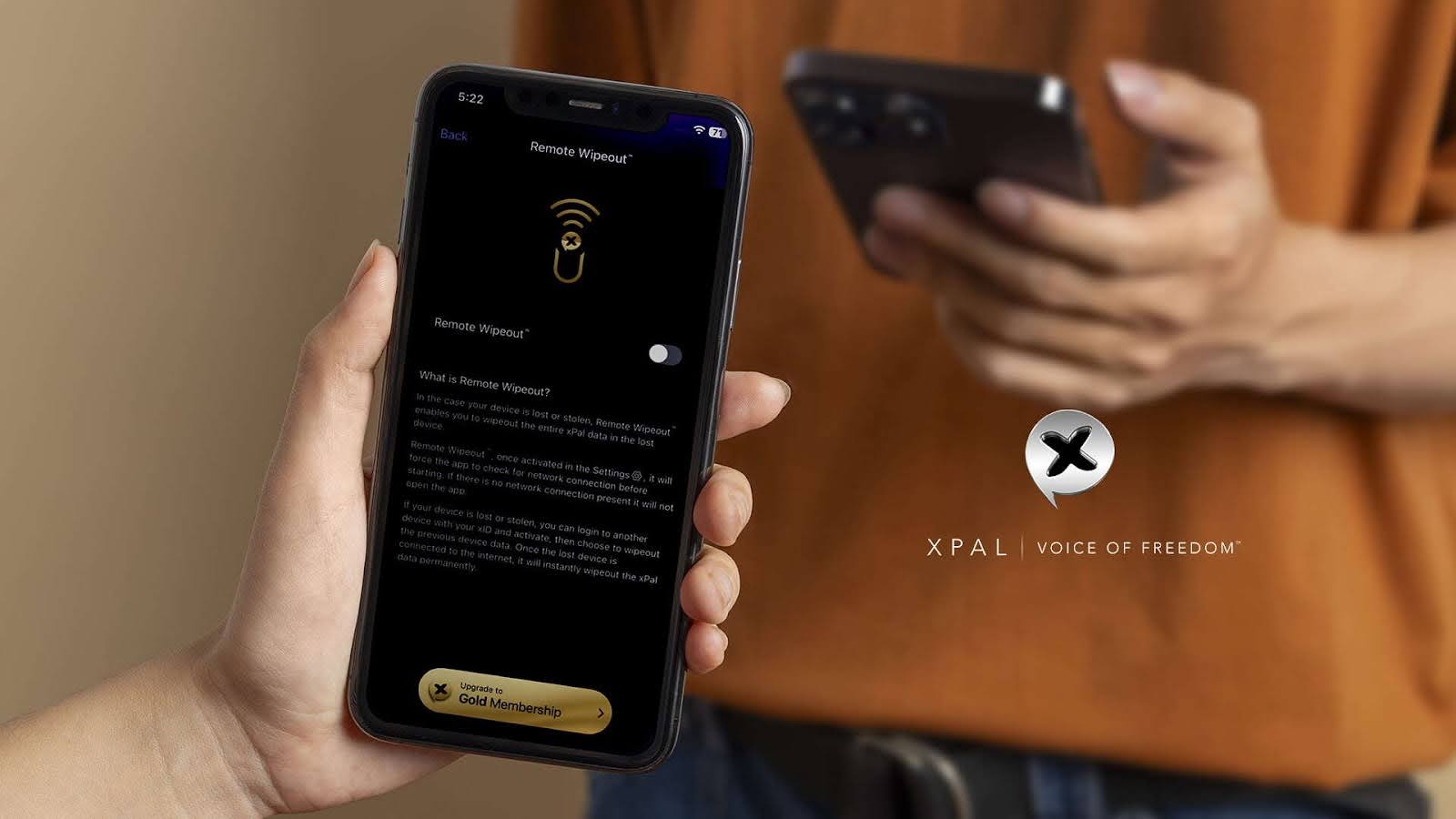
- Remote Wipeout, designed to erase xPal data from a lost device.
- Self-Destruct, designed to delete conversations and history from an inactive device after 7, 14, or 30 days.
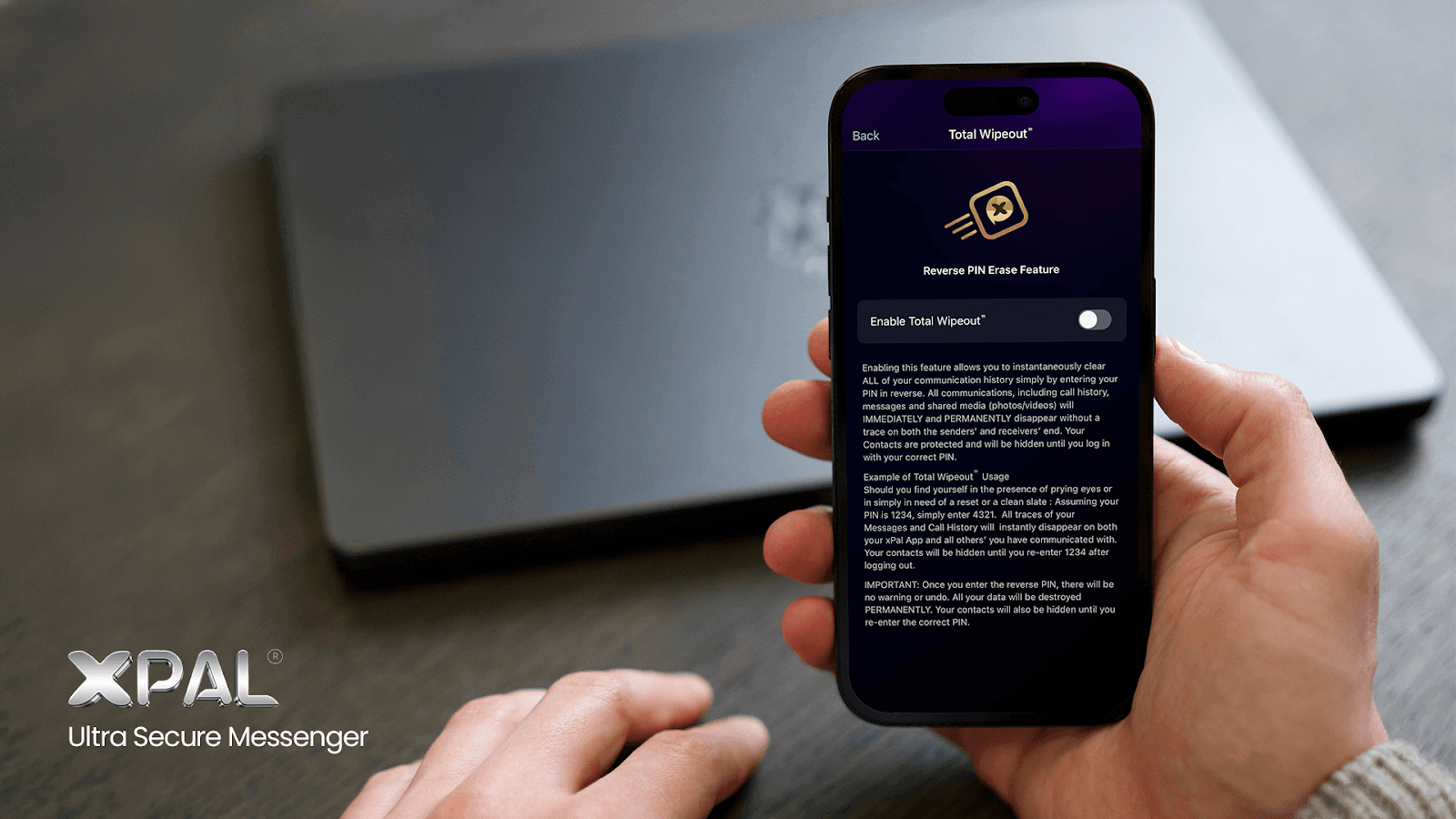
- Total Wipeout, which xPal describes as clearing call history, messages, and shared media from sender and receiver devices when the PIN is entered in reverse.
These tools should be used thoughtfully. They are designed to improve user control, but users should always keep their device secure and understand that a message may already have been copied, saved, or screenshotted by another participant.
How xPal supports private group communication
xPal positions itself as a privacy-first platform rather than a standard consumer chat app. Its website describes end-to-end encrypted messaging, audio and video calls, private group messaging, metadata sanitisation, disappearing messages, and device-level encrypted file storage.
It also lists external security validation and assessment information, including:
- NIST Cryptographic Algorithm Validation Program validation, identified as A7969.
- DEKRA independent cybersecurity audit and certification.
- Google App Defense Alliance CASA/MASA certification.
- Secure development practices aligned with OWASP Secure Coding Practices.
These assessments are useful indicators, but users should always review the current certificate scope, testing dates, product version, and official privacy documentation before relying on an app for highly sensitive communication.
For people who want a private messaging app that supports both individual and group conversations, xPal provides a set of features designed to reduce unnecessary exposure while keeping communication simple.
A simple checklist before creating a group
Before you create or join a group conversation, take a moment to consider the basics:
- Invite only people who need to be there.
- Avoid posting sensitive information that does not need to be shared with the entire group.
- Check privacy and notification settings before sharing a device.
- Use temporary messages for information that does not need a permanent record.
- Be mindful of photos and videos that may expose private details.
- Remove people from the group when their involvement ends.
- Protect your phone or computer with a strong passcode.
- Use a privacy-focused platform with group encryption and clear controls.
These small actions can make a major difference over time.
Conclusion
Group chats are where many of life’s important conversations happen. They hold family updates, work decisions, personal photographs, and private support.
That is why group privacy deserves more attention.
A private group chat app should do more than allow people to send messages. It should help protect group conversations, reduce unnecessary data exposure, offer controls for temporary information, and support safer sharing of files and media.
xPal combines end-to-end encrypted messaging and calls with private group messaging, metadata removal, disappearing-message controls, encrypted device-level file storage, and additional security tools for device access and data removal.
Privacy does not need to be complicated. It begins with choosing better tools and being intentional about what you share.